Practical guide
Text Heart vs Emoji Heart: Why ❤ and ❤️ Look Different
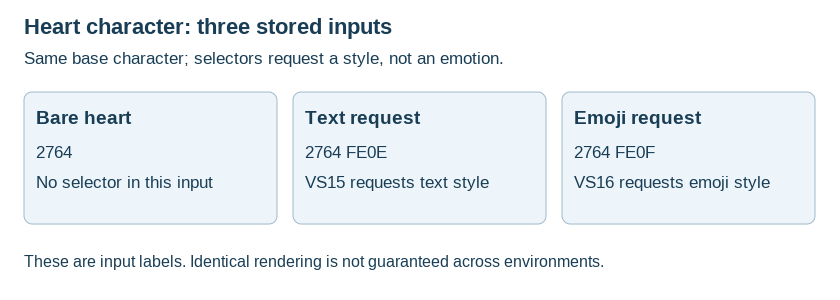
A plain-looking heart and a colorful heart may use the same base character with different presentation requests. U+2764 is the heart; U+FE0E requests text style and U+FE0F requests emoji style in registered sequences. Compare the original text first. A requested style does not guarantee an identical picture in every app, and a different drawing does not establish a different feeling.
Keep the original before changing the heart
If someone sent a screenshot, you have a picture of a display, not the stored characters. Ask for just the heart as text if the distinction matters. Keep private words out of a public comparison. If it is your own text, retain an untouched copy before using a different picker or adding anything.
There are two questions: did the underlying text change, and did another environment draw it differently? One can change without the other. A font choice, application or presentation request can affect the image; a copy that omits or inserts a character changes the input. Record what you actually find rather than diagnosing the app from the heart’s color. [1]
Compare the three heart inputs
On a narrow screen, scroll this table sideways. Keyboard readers can focus the table region and use the arrow keys.
| Literal text | Exact code points | What the input establishes |
|---|---|---|
❤ | 2764 | Bare heart character; no explicit presentation selector in this input. |
❤︎ | 2764 FE0E | Registered text-presentation sequence; VS15 requests text style. |
❤️ | 2764 FE0F | Registered emoji-presentation sequence; VS16 requests emoji style. |
🖤 | 1F5A4 | A separate black-heart character, not the same 2764 input with a style request. |
The samples above are live text. Their appearance depends on the system displaying this page; two may look alike here. The hex values are the reproducible distinction. The two selector sequences are in the captured variation file. The keyboard/display data also lists red heart with 2764 FE0F and a bare 2764 form, plus the separate black heart. [2][3]
The technical name in the variation file is “HEAVY BLACK HEART.” That name does not guarantee black ink: the same base can be presented with emoji artwork. Conversely, the separate black-heart character has a different code point. Neither fact settles affection, romance or a sender’s personal use.
Read a request as a request
VS15 and VS16 are invisible variation selectors. They are not extra heart pictures, a measure of emotional intensity or a command that every recipient must honor. Unicode describes emoji-default, text-default and text-only categories and says presentation style is not guaranteed. Environment and available rendering also matter. [1]
Registered variation sequences apply to particular characters. Do not append VS16 to arbitrary letters expecting to create a new emoji. Nor should you insert selectors into someone else’s combined emoji to make it “more colorful”: a text selector inside a ZWJ sequence can break joining, as the existing joined-sequence guide explains.
Check a copied heart without silently rewriting it
- Save a small original text sample and note where it came from.
- Copy that same sample into the destination. Keep it separate from any new heart picked there.
- Compare the actual code points if a local character inspector is available. The table is enough to interpret these four examples.
- If the code points differ, describe the difference: “This copy has 2764; the original had 2764 FE0F.” That establishes a changed string, not the cause.
- If the code points match but the drawings differ, record the two environments and actual versions if known. The observation concerns rendering of the same input.
- For a new message, use the app’s available picker and inspect the result. Keep a new selection labelled as a new input.
A software update is an option to investigate, not a guarantee of a particular drawing. This guide has not tested a device-support matrix. Avoid copying an entire private conversation into an online character checker merely to inspect one heart.
Choose a clear message or a controlled visual
If the practical message is “Thank you for helping,” write those words. A plain-looking heart does not cancel the thanks, and a red-looking heart does not add a promise the words never made. For a recurring ambiguous conversation, the tone-and-clarity guide keeps intention and essential details separate.
For a document whose exact artwork matters, use an appropriate graphic that you have rights to use rather than relying on live emoji text to stay identical. Give essential meaning in readable text as well. That is a different production choice from preserving a quoted message’s characters. Do not replace evidence in the original sample with your preferred drawing and then call it an unchanged copy.
Try three original comparison decisions
These constructed exercises explain the available evidence. They are not reports from real phones.
Case 1
The original heart is 2764 FE0F; a copied version is 2764. What is established?
Show answer and explanation for case 1
The underlying strings differ: the copy lacks FE0F.
That does not establish which app or action removed it. Keep both samples and record the actual copying route instead of attributing a cause from the picture.
Case 2
Two saved samples both contain 2764 FE0F but look different. Must someone have sent a different kind of affection?
Show answer and explanation for case 2
No. The same input can be rendered differently.
Presentation requests and environment concern appearance. A relationship claim needs the words and context, not the shape drawn for a code-point sequence.
Case 3
The file names 2764 HEAVY BLACK HEART. Must a red-looking rendering be a corrupt character?
Show answer and explanation for case 3
No. A technical character name does not prescribe that artwork color.
The registered emoji-presentation sequence uses that base character. Compare the input rather than treating black in the technical name as a screen-color requirement.
Keep an exact sample and the next question
Download the exact Unicode display samples. This plain-text file keeps literal inputs beside their expected code points. The deliberately spaced and ordinary-letter comparisons are labelled. It supplies inputs to compare, not results from a tested phone.
The useful note is small: original code points, copied code points, source and destination, observed appearance, and what remains unknown. If the unresolved issue is a flag or skin-tone component, choose the regional-flag comparison or skin-tone modifier route. Those use different sequence structures.
Sources and further reading
- Unicode Emoji 18.0, revision 31: presentation style and selectorsSections 4–4.4 and ED-8/ED-9 distinguish text and emoji style, defaults, environment and presentation requests.
- Unicode 18.0.0 emoji variation sequencesActually read registered 2764 FE0E and 2764 FE0F rows; technical name HEAVY BLACK HEART does not prescribe the rendered color.
- Unicode 18.0 emoji keyboard/display test dataSelected red-heart forms and separate black-heart character; data listing is not evidence of a device test.