Practical guide
Why a Skin-Tone Emoji Shows a Separate Swatch
A skin-tone swatch beside a hand can reflect an intact modifier sequence drawn as components, or a different string with an intervening character. In newly generated sequences, the modifier immediately follows an eligible base; it is not intended for arbitrary emoji. Compare the original input first. The five values describe requested appearance, not a sender’s identity or an identical shade on every system.
Separate the input from the picture
Keep the small original emoji as text. “A hand and a square” describes appearance. It does not reveal whether the modifier immediately follows the hand, whether a space intervenes, or whether the environment can combine the intact input. A screenshot may leave all three questions open.
A modifier changes the appearance of a preceding eligible base. It differs from ZWJ, which connects elements in other emoji sequences. The existing split-emoji guide includes a thumbs-up row to show that difference. Here we follow the modifier-specific check. [1]
Recognize the five modifier values
On a narrow screen, scroll this table sideways. Keyboard readers can focus the table region and use the arrow keys.
| Literal example | Modifier value and short name | Complete input |
|---|---|---|
👍🏻 | 1F3FB · light skin tone | 1F44D 1F3FB |
👍🏼 | 1F3FC · medium-light skin tone | 1F44D 1F3FC |
👍🏽 | 1F3FD · medium skin tone | 1F44D 1F3FD |
👍🏾 | 1F3FE · medium-dark skin tone | 1F44D 1F3FE |
👍🏿 | 1F3FF · dark skin tone | 1F44D 1F3FF |
All five complete inputs match actually read RGI_Emoji_Modifier_Sequence rows in the captured 18.0 data. The short names identify requested tones. Exact shades may differ across implementations; these live specimens are not photographs or calibrated color swatches. [1][2]
A person can select an offered appearance without identifying their ethnicity, medical skin type or the actual person depicted. Do not turn a modifier into personal information that the sender has not supplied.
Compare an immediate modifier with a space
On a narrow screen, scroll this table sideways. Keyboard readers can focus the table region and use the arrow keys.
| Literal input | Code points | What the input establishes |
|---|---|---|
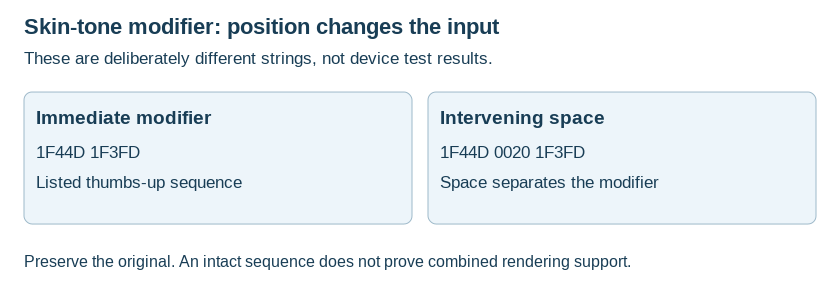
👍🏽 | 1F44D 1F3FD | Listed modifier sequence: the modifier immediately follows the base. |
👍 🏽 | 1F44D 0020 1F3FD | Constructed comparison with a space: a different string. |
🏽 | 1F3FD | Modifier alone; listed as a component, not a complete hand emoji. |
For a newly generated modifier sequence, the modifier must immediately follow its base. Unicode says another intervening character causes it to appear free-standing. It describes one legacy exception: older data may include FE0F between base and modifier, and implementations should ignore that selector. Selectors are neither needed nor recommended in newly generated modifier sequences. The space comparison is therefore not a blanket claim that every older selector-bearing sample is corrupt. [1]
Use an eligible base, not an arbitrary emoji
Unicode restricts modifiers to Emoji_Modifier_Base characters. They are not a universal color command for hearts, flags, objects or any other picture. For a different base, check current official data or the platform’s documented picker instead of assuming that the thumbs-up example transfers. [1]
Support and appearance can also differ. A system may not combine the input. The standard describes cases in which a modifier base has no visible skin in a particular implementation, or uses an unusual non-realistic default skin tone; modifier display may be suppressed under the specified conditions. No visible change does not alone prove that the modifier was deleted. [1]
A fully-qualified label in the data concerns emoji qualification. It is not proof that every font or app has rendered that input or that its shade stays identical.
Follow a source-preserving comparison
- Keep the original small text sample and note its actual source.
- Compare the code points. In these examples, distinguish immediate 1F3FD from 0020 followed by 1F3FD.
- If the stored input differs, label the copy or reconstruction as different text. Do not remove a space from the original and call it unchanged.
- If an intact documented input appears as separate components, record the app, font or document environment and known version. The observation does not establish the specific cause.
- For a new message, use the available tone choice in the platform’s picker where documented. A long-press palette is one possible interface, not a universal gesture promised here.
- Write essential actions in words. “I’ll review the file today” does not depend on a hand’s shade or combined rendering.
If you investigate an update or another font, keep the original input so the comparison can show whether the text changed. No phone or app has been tested for this guide, and an update is not a guaranteed fix. A local character check avoids sharing private chat content with an online service.
Try three original modifier decisions
These exercises use constructed inputs, not observed chat records.
Case 1
The original input is 1F44D 0020 1F3FD. Does it match the listed medium-tone thumbs-up sequence?
Show answer and explanation for case 1
No. It includes an intervening space.
The listed sequence is 1F44D 1F3FD. Removing the space creates a new input; preserve the original when investigating what was sent.
Case 2
The saved input is 1F44D 1F3FD but a swatch appears separately. Can you conclude the sender typed a space?
Show answer and explanation for case 2
No. The code-point record contains no space.
An intact input and a combined glyph are different questions. The observed appearance does not establish which rendering or support mechanism was responsible.
Case 3
A modifier looks slightly different in two apps. Does that prove a person changed their identity cue?
Show answer and explanation for case 3
No. Exact shades may vary, and appearance does not establish identity.
Compare the actual input before claiming it changed. Personal meaning needs the person’s words or context; a technical modifier name is not an identity record.
Keep the needed action separate from appearance
Download the exact Unicode display samples. The plain-text file keeps literal inputs beside their expected code points. The deliberately spaced and ordinary-letter comparisons are labelled. It supplies inputs to compare, not results from a tested phone.
Keep the input, observed shape and remaining question separate. For an invisible text-or-emoji style request, use the heart-selector comparison; for letter-like flag components, use the regional-flag route. Return to the message itself when deciding how to reply.
Sources and further reading
- Unicode Emoji 18.0, revision 31: diversity and modifiersSection 2.4 and ED13: five modifiers, base restrictions, adjacency, fallback, legacy-selector exception and shade variation.
- Unicode 18.0 emoji sequence dataFive actually read thumbs-up modifier sequences with the official short names.
- Unicode 18.0 keyboard/display test dataSelected thumbs-up, medium modifier and combined-input rows; no device-support result implied.