Practical guide
Slack Status, Away and Paused Notifications: Three Different Signals
Distinguish Slack status, active or away availability and paused notifications, including manual settings, scheduled statuses and documented exceptions.
On this page
Read status, availability and notifications separately
A Slack status, an active/away dot and paused notifications answer different questions. A status is a message about what a person is doing. Availability is the dot indicating active or away. Pausing notifications is a separate control for limiting interruptions.
A meeting emoji is therefore not a read receipt, and an away dot is not an automatic statement that all notifications are off. If you need to know whether a colleague can complete a task, read their reply or ask for the missing commitment.
The following examples are deliberately constructed. They explain the documented distinctions without reporting a live account or a particular colleague’s behavior.
Keep the three questions visible
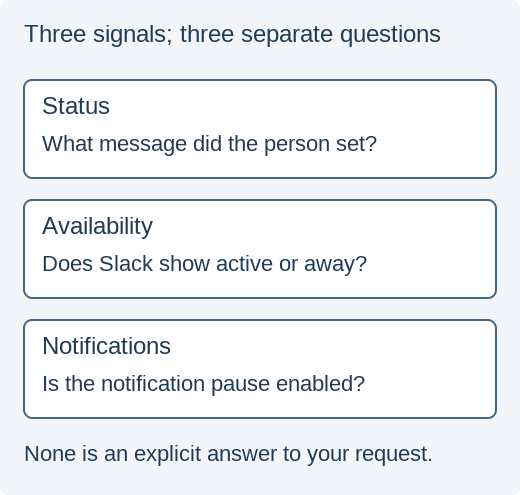
Download this original labelled diagram
On a narrow screen, scroll inside this table. Keyboard users can focus the region and use the arrow keys.
| Case | Status | Availability | Notification pause | What remains unknown |
|---|---|---|---|---|
| A | In a meeting | Active | Not specified | Whether the request was read |
| B | No status | Away | Not specified | Whether notifications are paused |
| C | Working on a report | Active | Paused | What caused the pause |
| D | Back at 14:00 | Manually away | Not specified | Actual return or response time |
| E | Scheduled lunch status | Not specified | Not specified | Whether any message is scheduled |
Download all five constructed signal records
“Not specified” is an important value. Do not fill it in by guessing from another column. Someone can describe a meeting without selecting a pause option, or set themselves away manually without explaining what they are doing.
Understand the active and away dot
Slack says availability is active when Slack is open on a desktop or mobile device. It changes to away after 10 minutes of desktop inactivity, or when the mobile user navigates away from or closes the app. Members can also manually set themselves active or away.
- On desktop, click your profile picture and choose Set yourself as away or Set yourself as active.
- On mobile, tap your profile picture and choose the corresponding availability option.
- Use the dot as the displayed availability state, then check the actual message when a response matters.
Documented controls: [2].
Automatic and manual availability explain why you should not treat the dot as proof of attention to your particular post. It does not identify which conversation was open, what the person understood, or whether they can meet your deadline.
Set a status without confusing it with a message
On desktop, open your profile picture and Update your status. Enter text, choose an emoji if useful, and select when the status should clear. The desktop status dialog can optionally pause notifications until the status clears. That checkbox is the separate notification choice; the written status alone is not the pause.
On mobile, open your profile picture and the status field, enter the status, select an emoji and a Clear after time, then finish. Use the mobile instructions rather than assuming every desktop option has an identical mobile location.
Documented controls: [2].
Slack also documents scheduling a status by choosing a start and end time, with up to five scheduled statuses. That schedules your status, not a channel message or a to-do reminder. Automatic statuses for huddles, focus mode or working hours are another preference. Depending on organization settings, a status may be visible in externally shared conversations.
Check the pause and its documented exceptions
On desktop, your profile picture → Notifications provides a duration for pausing, a custom period and a resume control. On mobile, your profile picture → Pause notifications provides the corresponding pause and resume options. Routine notification schedules let you choose days and allowed hours.
Documented controls: [1].
Slack describes a snooze icon beside the name while notifications are paused. Its help also says a sender of an urgent DM can override the pause once per day, and points to a VIP option for receiving notifications from particular people even during a pause. Those exceptions matter when investigating an interruption.
Do not promise that an urgent override always applies to every mention or that every person is on a VIP list. Check the real setting and the current linked VIP instructions before relying on that feature. A single channel’s mute is also narrower than a general pause; use the mute guide when only one conversation is distracting.
Try three signal checks
Keep the fact supplied by each cue separate from the action you need.
Case 1
An invented colleague shows active with “In a meeting.” Does this prove they read your deadline request?
Show answer and explanation for case 1
No.
The availability dot and status message do not identify attention to that specific message. Ask for a response when the deadline depends on it.
Case 2
A status says “Working on a report.” Must notifications be paused?
Show answer and explanation for case 2
No.
Desktop status can optionally enable a pause, but the text alone does not establish that choice. Check the pause control or snooze indication separately.
Case 3
You scheduled a lunch status. Is a lunch announcement automatically scheduled for your channel?
Show answer and explanation for case 3
No.
Scheduled status changes the profile status at the chosen time. Sending a later conversation message requires the message-scheduling control.
Sources and further reading
- Slack Help: Pause your Slack notificationsOfficial control descriptions for pause your slack notifications. Consult current help and your actual workspace settings if controls differ.
- Slack Help: Set your Slack status and availabilityOfficial control descriptions for set your slack status and availability. Consult current help and your actual workspace settings if controls differ.