Practical guide
Slack @here, @channel and @everyone: Who Is Notified?
@everyone targets general, @channel targets channel members and @here targets active channel members. Thread use, paused notifications and workspace permissions limit what the mentions do.
On this page
Choose the smallest audience that fits
In Slack, @everyone, @channel and @here are notification controls with different scopes. They are not three interchangeable ways to make a message important. Start with who needs the information, then check where you are posting and whether you may use that mention.
On a narrow screen, scroll inside this table. Keyboard users can focus the region and use the arrow keys.
| Mention | Intended audience | Where or when it fits |
|---|---|---|
| @everyone | Everyone in general, active or away | General channel only |
| @channel | All members of that channel, active or away | Information relevant to the whole channel |
| @here | Active members of that channel | A question intended for people active now |
General automatically includes members except guests. Guests cannot use @everyone by default. None of these descriptions promises that every recipient reads the message or accepts a task.
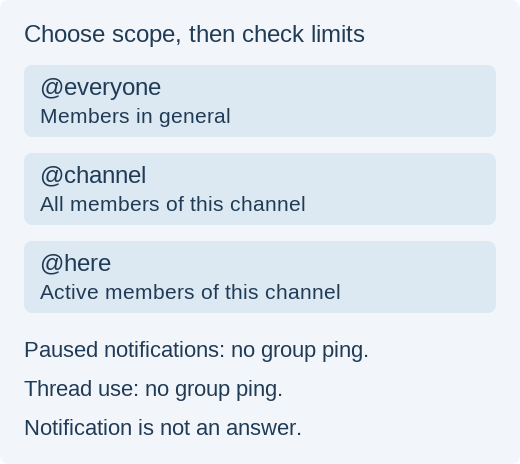
Download this original labelled diagram
Documented controls: [1].
Check the two important notification exceptions
Slack states that these mentions do not notify people whose notifications are paused, and do not notify when used in threads. “All channel members” therefore describes the audience scope subject to those documented exceptions; it is not a way to bypass a pause.
A thread reply containing @channel is not equivalent to a main-channel announcement that produces the group notification. If the whole channel needs a separate announcement, decide whether to write a clear main-channel post, while retaining a link or explanation of the relevant discussion.
The pause help separately describes an urgent DM sender’s once-per-day override and a VIP notification option. Those are not evidence that @here, @channel or @everyone can override paused notifications. This guide does not provide a VIP configuration procedure or assert who qualifies for that option.
Recognize permission and large-channel limits
Owners and admins with permission may restrict who can use the three mentions. If the option is unavailable, ask an owner about the workspace rule. Do not treat the restriction as something to bypass by placing the mention in a thread.
In an Enterprise organization, if a channel has 10,000 or more members, only owners and admins can use @channel and @here. The threshold and role condition matter together; do not generalize that restriction to every small channel or every workspace.
In channels with at least six members, Slack normally asks you to confirm before sending a message using these mentions. Owners and admins can turn that warning off. A missing confirmation dialog does not establish that your mention failed, and a displayed warning does not establish that everyone will read the post.
Documented controls: [1].
Make the announcement useful before adding a mention
Original hypothetical example: version B changes a review deadline for every member of #layout-review. A main-channel @channel post can fit that audience if permitted. Write the changed deadline and action explicitly: “Version B review is due Thursday at 16:00 UTC. Please add your layout comments in the version B thread.” The invented time is an example, not a real team’s deadline.
If you only need an available person to answer a small question now, @here has a different scope. If one person owns the task, a direct mention may be more appropriate than a group ping. Slack recommends using group mentions sparingly; adding all three does not make the action clearer.
Choose one audience, name the change, specify the requested action, and provide the context needed to act. When acknowledgement matters, request a clear response. A notification is a cue, not a recorded agreement.
Download five complete constructed group-mention decisions
Documented controls: [1].
Separate an absent response from a notification diagnosis
Suppose a colleague does not answer an @here announcement. The mention intentionally targets active channel members, and pauses can prevent notifications. Those are possible documented limits, not proof of the colleague’s actual state. You cannot diagnose their settings or intentions from silence alone.
For @channel, check the posted location, the workspace permission and the pause exception before asserting that the whole channel was alerted. For @everyone, first check that the message is in general. A group mention still does not provide an individual reading receipt.
For a consequential coordination task, follow the team’s established contact procedure and obtain an explicit answer. These Slack controls should not be presented as a guaranteed universal emergency-delivery system. That conclusion follows from their documented limits, not from a fabricated failure test.
Practise three audience decisions
These scenarios are constructed from the documented scope and exceptions; no workspace messages were sent.
Case 1
You need all members of a project channel, including away members, to receive a relevant announcement. Which scope fits before checking exceptions?
Show answer and explanation for case 1
@channel, in a main-channel post if permitted.
@here is active-members only and @everyone is general only. Paused recipients are still not notified, and notification does not prove reading.
Case 2
You wrote @channel inside a thread and expect the group notification. Is that expectation supported?
Show answer and explanation for case 2
No; these mentions do not notify when used in threads.
A thread reply is a different posting context. Decide deliberately whether a separate main-channel announcement is appropriate.
Case 3
An ordinary member tries @here in a 10,000-member Enterprise channel. Is the feature open to everyone there?
Show answer and explanation for case 3
No; only owners and admins may use @here or @channel at that threshold.
The documented Enterprise large-channel role restriction applies. Ask an owner rather than suggesting a bypass.
Sources and further reading
- Slack Help: Notify a channel or workspaceOfficial control descriptions for notify a channel or workspace. Consult current help and your actual workspace settings if controls differ.
- Slack Help: Pause your Slack notificationsOfficial control descriptions for pause your slack notifications. Consult current help and your actual workspace settings if controls differ.