Practical guide
Blue or Green iPhone Messages: iMessage, RCS and Read Receipts
Blue iPhone bubbles identify iMessage. Green bubbles can be RCS or SMS/MMS; RCS can support read receipts. Identify the transport before interpreting a missing Read label.
On this page
What blue and green actually tell you
Blue means iMessage; green means either RCS or SMS/MMS. Both iMessage and RCS support delivery and read receipts. A green bubble therefore does not automatically mean a basic SMS or a message without receipt support.
Color identifies the message family on your device. It does not, by itself, tell you whether the recipient opened that message, why a conversation changed transport, or whether someone accepted your request. Apple’s transport guide supplies the color meanings; it does not provide a “green means blocked” diagnostic rule.
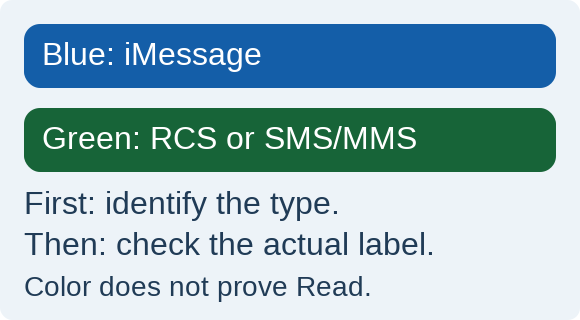
Sources: [1].
Compare the three message transports
| Message type | Bubble on your iPhone | What Apple documents | What you still need to check |
|---|---|---|---|
| iMessage | Blue | Delivery/read receipts and typing indicators; Wi-Fi or cellular data to another Apple device. | Whether a Read label is actually present and the other person sends read receipts. |
| RCS | Green | Delivery/read receipts and typing indicators; carrier-provided service. | iOS 18 or later, a supporting carrier plan and the actual conversation’s receipt behavior. |
| SMS/MMS | Green | Carrier text-messaging service; the overview does not promise the iMessage/RCS read-receipt features for this transport. | Identify the transport. Do not apply an iMessage receipt conclusion from bubble color alone. |
On a phone, scroll inside the table to read its final column. Keyboard users can focus the table and use the arrow keys.
“Supports read receipts” describes a capability. It does not guarantee that every message will show Read. Apple says you cannot turn read receipts on for another person; their own setting matters when you expect a receipt back.
A four-step check when the bubble is green
- Start with the particular message. Record the bubble color and any actual label beneath it. A conversation can contain different observations; avoid deciding the status of every message from a single bubble.
- Separate color from transport. Green leaves two possibilities in Apple’s overview: RCS and SMS/MMS. If the message or composer explicitly identifies RCS, use that cue. If you do not have a visible type cue, leave the transport unresolved rather than guessing from color.
- Check the prerequisites only if you are trying to use RCS. Apple requires iOS 18 or later and a text-messaging plan from a carrier supporting RCS on iPhone. The guide warns that activation may take a few hours. Your carrier can confirm support; a bubble is not a substitute for that confirmation.
- Interpret the actual receipt separately. A displayed Read label concerns the reported reading state. A missing label does not supply a reason for the absence. If your practical task is a meeting time or approval, ask for that answer explicitly.
These steps are a reading and settings check, not an account test. They do not identify a blocked number, network failure or another person’s intentions. If your task is delivery troubleshooting, use the current device and carrier help for that transport.
Does green also tell you whether a message is encrypted?
Color is insufficient for that question too. Apple’s May 11, 2026 overview describes end-to-end encrypted RCS messaging as a beta starting with iOS 26.5, available with supported carriers and rolling out over time. All participants need carriers that support encryption for the conversation to be end-to-end encrypted.
The documented RCS cue is “Encrypted” with a lock icon at the top of that conversation. Do not label every green RCS message encrypted, or assume a green SMS/MMS message has iMessage protection. Apple’s overview describes SMS/MMS as not end-to-end encrypted. Check the actual transport and indicator when that distinction matters.
Sources: [1].
Four example observations, with the missing information left visible
The following situations are invented explanations. They are not screenshots, interviews or tests of a real recipient.
| Observation | Supported conclusion | Conclusion to avoid |
|---|---|---|
| Blue bubble; Delivered is visible. | This is an iMessage transport observation plus a delivered label. | “They accepted tomorrow’s appointment.” There is no such answer here. |
| Green bubble; RCS is explicitly identified; Read is visible. | Green RCS can have a read receipt. | “Green messages never show Read.” |
| Green bubble; message type is known to be SMS/MMS. | Use SMS/MMS scope rather than iMessage/RCS receipt assumptions. | “Turning my own iMessage receipt switch on makes this message show their Read.” |
| Green bubble; no message type or receipt label recorded. | Transport and reading state remain unresolved. | “They blocked me.” Color alone is insufficient. |
On a phone, scroll inside the table to read its final column. Keyboard users can focus the table and use the arrow keys.
This is why a useful note has separate fields for color, known transport and actual label. Collapsing them into “green = unread” destroys the information needed for the next check.
Check three interpretations
Choose the supported conclusion before reading the explanations.
Case 1
An invented iPhone conversation has a green bubble, an explicit RCS cue and Read beneath one message. Is that inconsistent with Apple’s color meanings?
Show answer and explanation for case 1
No. RCS is green and Apple documents read-receipt support for it.
The error would be treating all green messages as SMS/MMS. Keep the observed transport and receipt separate; the receipt still does not express agreement to the message’s request.
Case 2
A blue Delivered message asks “Can you approve the date?” No reply is recorded. Can the sender mark the date approved?
Show answer and explanation for case 2
No. Delivered is not an approval answer.
The transport and label answer different questions from an explicit decision. A useful follow-up asks for approval or a proposed alternative, rather than using a receipt as the decision.
Case 3
A green bubble has no visible transport label. The sender wants to know whether that conversation has encrypted RCS. What must remain unresolved?
Show answer and explanation for case 3
The transport and encryption state.
Apple describes both RCS and SMS/MMS as green and makes RCS encryption conditional on supported carriers and a displayed indicator. Color alone cannot choose the transport or satisfy those conditions.
Choose the next useful action
If the problem is the receipts you send, use the iPhone global and contact-exception guide. If it is carrier RCS availability, check the current carrier-supported requirements in Apple’s source below. If it is an unanswered decision, ask the recipient for the decision in words.
A workplace Teams chat has different eligibility, group-size and policy rules. Use the Teams Seen and Read by guide for that app, rather than carrying iPhone color assumptions across to it.
Download a private blank message-check checklist
The checklist is an optional local note. Do not paste another person’s messages, phone number or private conversation into a public form.
Sources and further reading
- Apple Support: iMessage, RCS and SMS/MMSPublished May 11, 2026. Message colors, transport capabilities, carrier prerequisites and conditional RCS encryption.
- Apple iPhone User Guide: Turn read receipts on or offiPhone guide with iOS 27 selected: sending receipts, global settings and individual-contact exceptions. Check the guide for your installed version.